
A website is not something you can simply launch and forget. Software needs updates, backups need to be checked, contact forms need to keep working, and important pages should remain fast, secure, and useful for visitors.
This is where website maintenance comes in. Regular maintenance helps businesses keep their websites reliable, reduce avoidable technical problems, and provide a better experience for potential customers.
But what does website maintenance actually include? How often should you maintain your website, what does it cost, and when does it make sense to hire a professional?
In this guide, we will cover the essential website maintenance tasks, explain how often they should be performed, and help you decide which approach is right for your business.
What Is Website Maintenance?
Website maintenance is the ongoing process of checking, updating, protecting, and improving a website after it has been launched.
The exact tasks depend on how the website is built. A simple business website may need occasional software updates, backups, security checks, and content changes. An online store or web application may require more frequent testing, monitoring, and technical support.
Website maintenance can include:
- Updating the website platform, themes, and plugins
- Creating and checking backups
- Monitoring security and website availability
- Testing contact forms and other important functionality
- Fixing broken links and technical errors
- Monitoring website speed and performance
- Updating outdated content and business information
- Checking analytics and search engine visibility
Maintenance is not necessarily the same as redesigning a website or adding major new features. Its primary purpose is to keep the existing website working as intended while identifying opportunities for improvement.
Why Is Website Maintenance Important?
A website often plays an important role in attracting customers, answering questions, and generating enquiries. If something stops working, the business may not notice immediately.
Regular maintenance helps reduce several common risks.
1. Security Risks
Outdated software, themes, and plugins can contain known security vulnerabilities. Weak passwords, unnecessary administrator accounts, and poor backup practices can also increase risk.
Keeping software updated, limiting access, and maintaining reliable backups can help protect your website. However, no maintenance routine can guarantee complete security.
2. Broken Features and Lost Enquiries
A contact form may stop sending messages. A button may lead to a missing page. A plugin update may affect part of the website.
These problems can go unnoticed unless someone tests the website regularly. For a business that relies on online enquiries, even a small technical issue can mean missed opportunities.
3. Poor Performance and User Experience
Slow pages, layout problems, and features that do not work well on mobile devices can frustrate visitors.
Monitoring performance and testing important pages helps identify problems before they affect too many users. Google’s Core Web Vitals provide useful measurements of loading performance, responsiveness, and visual stability.
4. Outdated Information
Old prices, discontinued services, incorrect contact details, and outdated opening hours can confuse potential customers.
Keeping content current helps visitors make informed decisions and makes the business appear more reliable.
5. Technical SEO Problems
Broken links, accidental indexing restrictions, missing redirects, and other technical issues can affect how search engines access and understand a website.
Maintenance does not guarantee higher Google rankings, but it can help identify and resolve technical problems that interfere with a site’s visibility.
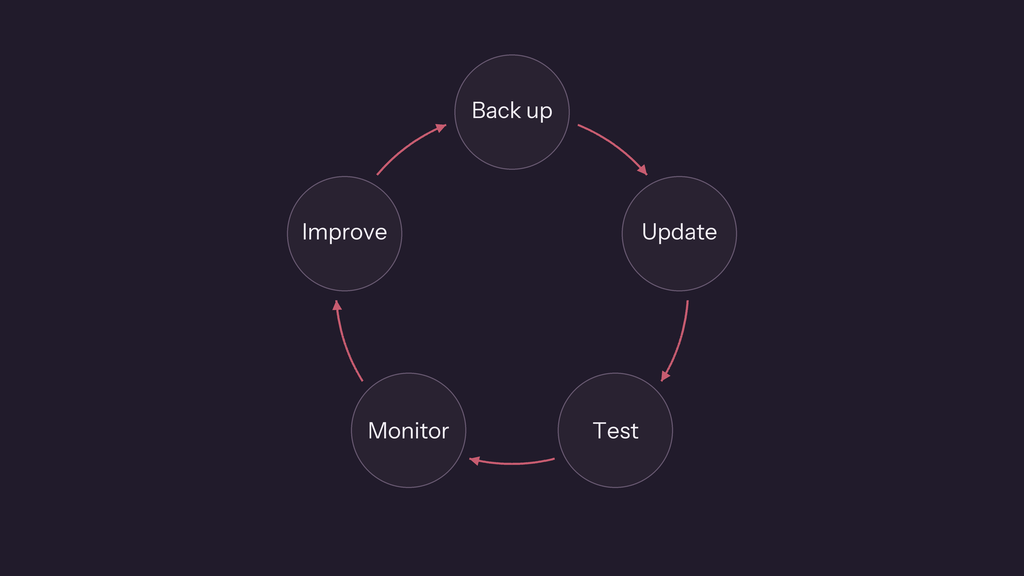
What Does Website Maintenance Include?
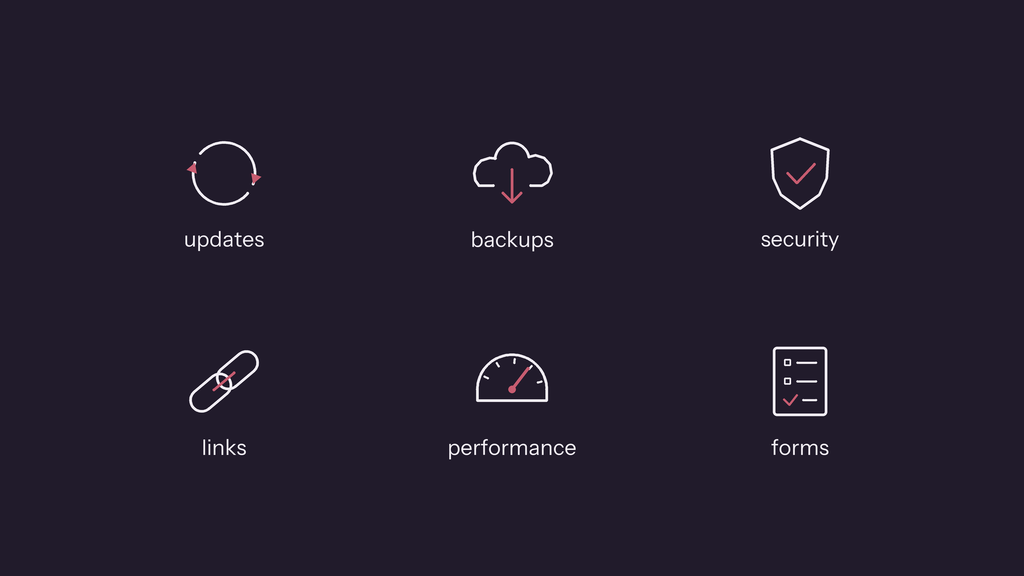
A useful maintenance routine covers more than software updates. The following tasks are relevant to many small business websites, although the exact requirements depend on the platform and the site’s complexity.
1. Software, Theme, and Plugin Updates
Websites built with content management systems such as WordPress often rely on several components working together.
Maintenance may include:
- Updating the website’s core software
- Updating themes and plugins
- Removing unused or unnecessary extensions
- Checking whether important plugins are still supported
- Testing the website after updates
Updates should be handled carefully. Before higher-risk changes, make sure a suitable backup is available. After updating, check important pages and features rather than assuming everything still works.
For more complex websites, testing changes on a staging site before applying them to the live website can reduce the risk of disruption.
2. Backups and Recovery
A backup provides a way to recover website files and data if something goes wrong. Problems can result from technical failures, accidental changes, incompatible updates, or security incidents.
A maintenance routine should consider:
- Whether backups are running successfully
- Whether both website files and the database are included where applicable
- Where backup copies are stored
- How long backups are retained
- Whether the restoration process has been tested
A backup is only useful if it can be restored. For important business websites, it is worth confirming that the recovery process works and that backup copies are not dependent on the same system as the live website.
How frequently backups are needed depends on how often the website changes and how much data the business could afford to lose.
3. Security Checks
Website security involves more than installing a security plugin.
Depending on the platform, maintenance may include:
- Applying security updates promptly
- Reviewing administrator accounts and permissions
- Removing accounts that no longer need access
- Checking for suspicious activity or unexpected changes
- Using strong passwords and multi-factor authentication where available
- Reviewing hosting and domain account security
- Confirming that HTTPS works correctly
Security monitoring and backups are complementary. Security measures help reduce risk, while backups support recovery if something goes wrong.
4. Broken Links and Technical Errors
Websites change over time. Pages are removed, URLs are changed, and external websites may move or disappear.
Regular checks can identify:
- Internal links that lead to missing pages
- External links that no longer work
- Unexpected 404 errors
- Redirects that point to the wrong destination
- Navigation items that no longer work
- Images or embedded content that fail to load
When a page has permanently moved, a relevant redirect may be appropriate. Not every missing URL should redirect to the homepage; the destination should make sense to the visitor.
5. Website Speed and Performance
A website should remain reasonably fast and responsive as new content, plugins, images, and features are added.
Performance maintenance may include:
- Checking page loading times
- Optimizing oversized images
- Reviewing caching and other performance settings
- Identifying unnecessary scripts or plugins
- Testing key pages on mobile devices
- Reviewing Core Web Vitals where relevant
Google’s Core Web Vitals provide three useful reference points for user experience:
- Largest Contentful Paint (LCP): aim for 2.5 seconds or less.
- Interaction to Next Paint (INP): aim for 200 milliseconds or less.
- Cumulative Layout Shift (CLS): aim for 0.1 or less.
These are recommended thresholds, not guarantees of rankings or conversions. Actual performance can vary by page, device, network, and visitor.
6. Contact Forms and Website Functionality
A website can look perfectly normal while an important feature is broken.
Testing should focus on the actions that matter to the business, such as:
- Submitting contact or quote request forms
- Confirming that form notifications arrive
- Checking important buttons and links
- Testing booking or payment flows where applicable
- Reviewing integrations with third-party services
- Checking mobile navigation and interactive elements
For an online store, this may also include testing checkout, payment methods, order notifications, and other critical purchasing steps.
7. Content Updates
Website maintenance can also involve keeping information accurate and useful.
Examples include:
- Updating service descriptions and prices
- Correcting contact details and opening hours
- Replacing outdated images
- Removing references to discontinued products
- Updating old blog posts when information changes
- Adding new testimonials or project examples when available
Large content projects may fall outside a basic maintenance agreement, so it is important to define what is included in any service plan.
8. SEO and Analytics Monitoring
Technical maintenance can help you identify problems that affect how visitors find and use your website.
Depending on the site, regular checks may include:
- Reviewing Google Search Console for indexing or crawling issues
- Checking that important pages remain accessible to search engines
- Reviewing broken links and redirects
- Confirming that the XML sitemap is available when needed
- Checking whether analytics are still collecting data
- Reviewing changes in organic traffic and important enquiries
Maintenance is not a substitute for a complete SEO strategy. Keyword research, content creation, and link building may require separate work. However, technical monitoring helps ensure that basic problems do not go unnoticed.
How Often Should You Maintain a Website?
There is no single schedule that suits every website. A small brochure website has different needs from an online store, membership site, or application that processes customer information.
The following schedule is a practical starting point. Adjust it to your website’s risk, activity, and business importance.
Weekly
- Review available software and security updates.
- Check backup status and important alerts.
- Look for obvious errors or downtime.
- Test critical features when the website generates enquiries or sales.
Monthly
- Test contact forms and important user journeys.
- Review broken links and technical errors.
- Check website performance and mobile usability.
- Review security basics and administrator access.
- Look for outdated business information.
- Review important analytics or search visibility changes.
Quarterly
- Review installed plugins, themes, and unused components.
- Check whether important backups can be restored.
- Review website content and key landing pages.
- Check domain and hosting arrangements, including upcoming renewals.
- Review user accounts, permissions, and integrations.
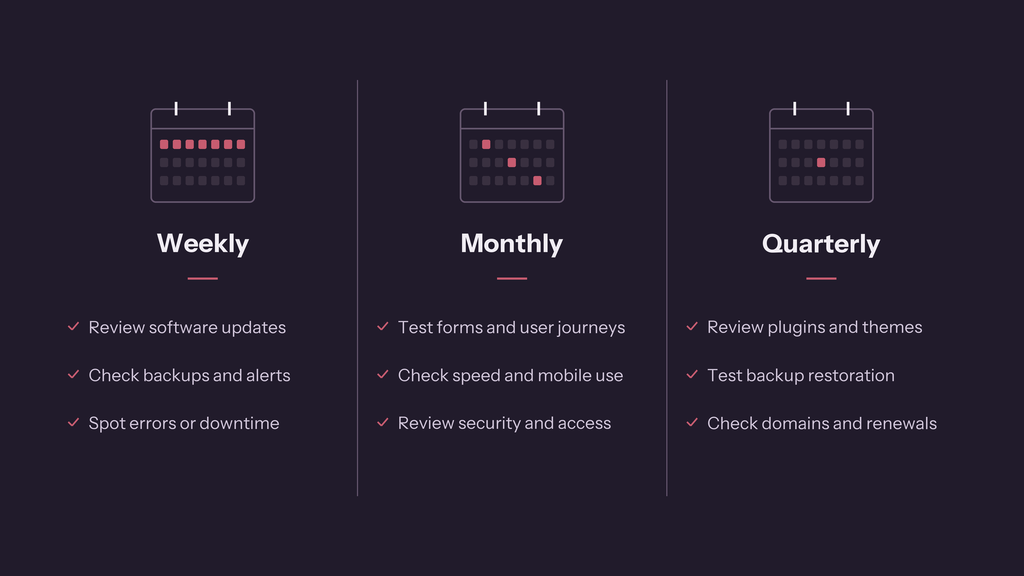
These intervals are guidelines, not universal rules. Security updates may need attention sooner, while some content reviews can happen less frequently. Websites with payments, bookings, or frequent changes generally need a more rigorous maintenance process.
Website Maintenance Checklist
Use this checklist to review the basic health of your website.
- Website pages load and display correctly.
- The site works on mobile devices.
- WordPress (or other CMS you might use), themes, and plugins are appropriately updated.
- Backups are running and a recovery process is available.
- Administrator accounts and permissions are appropriate.
- Contact forms deliver messages successfully.
- Important buttons, links, and navigation work.
- Broken links and unexpected 404 errors are investigated.
- Website speed and performance are reviewed.
- Important business information is accurate.
- HTTPS works correctly.
- Search Console and analytics are functioning where installed.
- Domain and hosting renewals are not at risk of being missed.
This list covers common maintenance tasks rather than every possible technical requirement. Online stores, membership sites, and custom applications may need additional checks.
How Much Does Website Maintenance Cost?
Website maintenance costs vary according to the platform, complexity, level of support, and amount of work included.
A basic maintenance service may focus on updates, backups, and routine health checks. A more comprehensive agreement may also include performance monitoring, troubleshooting, small content changes, reporting, and a defined amount of development time.
Common pricing models include:
Monthly maintenance plans: A recurring fee covers a defined set of checks and services. This can be useful for businesses that want ongoing support and predictable costs.
Hourly support: You pay for work when an issue occurs or when a specific change is needed. This can suit websites that need little regular attention, although costs are less predictable.
One-off maintenance or repair projects: A professional reviews the website, resolves a known issue, or carries out a defined set of improvements.
Before comparing prices, check what is actually included. Does the plan cover emergency fixes? Are content changes included? Is development time capped? Are hosting, licences, and backups charged separately?
For a broader overview of initial website costs, see our guide: How Much Does a Business Website Cost?.
DIY Website Maintenance vs. Hiring a Professional
You do not necessarily need to outsource every maintenance task. The right choice depends on your technical confidence, available time, and how important the website is to your business.
Maintaining Your Website Yourself
DIY maintenance can work well if your website is relatively simple and you are comfortable managing updates, backups, and basic troubleshooting.
Advantages:
- You retain direct control of the website.
- You can avoid paying for routine support.
- You learn more about how your website works.
Challenges:
- Maintenance takes time and needs to be performed consistently.
- Updates can occasionally cause compatibility problems.
- Diagnosing technical issues may require skills you do not have.
- You are responsible for noticing and resolving problems.
Hiring a Website Maintenance Professional
A professional can take responsibility for agreed maintenance tasks and help investigate problems when they arise.
Advantages:
- Less time spent on routine technical tasks.
- Help with troubleshooting and unexpected issues.
- A defined process for updates, backups, and checks.
- Access to technical expertise when needed.
Challenges:
- Ongoing costs need to fit your budget.
- Service plans differ, so the scope must be clear.
- A maintenance plan does not automatically include unlimited development or immediate emergency support.
For many small businesses, a practical approach is to handle simple content edits internally while outsourcing technical maintenance and more complicated fixes.
Signs Your Website Needs Maintenance
Consider reviewing your website if you notice any of the following:
- Pages have become noticeably slower.
- Contact form submissions are missing.
- Plugins or other components have not been updated for a long time.
- Visitors encounter broken links or missing pages.
- The mobile layout no longer works correctly.
- You see unexpected redirects, warnings, or suspicious changes.
- Important business information is outdated.
- You cannot confirm whether recent backups are working.
- Nobody knows who manages the domain, hosting, or administrator accounts.
You do not need to wait for a major failure before reviewing your website. Regular checks can help you identify problems while they are still manageable.
Website Maintenance vs. Website Redesign
Website maintenance and redesign serve different purposes.
Maintenance keeps the existing website secure, functional, and up to date. It may include technical fixes, updates, content changes, and performance improvements.
Redesign involves more substantial changes to the website’s layout, appearance, structure, or user experience. It may be appropriate when the site no longer reflects the business, is difficult to use, or cannot support new requirements.
If your website is fundamentally sound but has occasional technical issues, maintenance may be enough. If the structure and user experience are holding the business back, a redesign may offer more value.
A website audit can help you identify which issues should be fixed first. Read our Website Audit Checklist: 25 Things to Check on Your Website for a practical starting point.
Final Thoughts: Keep Your Website Working for Your Business
Website maintenance is an ongoing part of running a business website. Regular updates, reliable backups, security checks, performance reviews, and functionality testing help reduce avoidable problems and keep your website useful to visitors.
The right maintenance routine depends on your website and how your business uses it. You may be able to handle the basics yourself, or you may prefer professional support so you can focus on running your business.
If you need help maintaining a WordPress website, fixing technical issues, or improving website performance, Embryo Systems can help you identify the next steps.
Frequently Asked Questions
What does website maintenance include?
Website maintenance commonly includes software updates, backups, security checks, broken-link checks, performance monitoring, functionality testing, and content updates. The exact scope depends on the website and the maintenance agreement.
How often should a website be maintained?
Important checks should happen regularly, with the frequency depending on the site’s complexity and risk. Many small business websites benefit from weekly checks of updates and backups, monthly functionality and performance reviews, and broader quarterly reviews.
Is website maintenance necessary for a small business?
Yes, if the website supports your business by attracting visitors, answering customer questions, or generating enquiries. Even a simple website can develop broken links, outdated information, or technical issues over time.
Can I maintain my own website?
Yes. Many website owners can handle basic content changes and routine checks themselves. More complex updates, security issues, recovery work, and technical troubleshooting may require professional assistance.
Does website maintenance improve SEO?
Maintenance can help identify technical problems such as broken links, accessibility issues for search engines, and performance problems. It does not guarantee higher rankings; SEO also depends on content quality, relevance, competition, and other factors.
What is the difference between website hosting and website maintenance?
Hosting provides the infrastructure that makes your website available online. Website maintenance involves ongoing tasks that keep the website itself updated, functional, secure, and useful. Some providers offer both, but they are not the same service.